Interaction Design Service Design UX Research Conversational UX Information Architecture

Redesigning the e-Healthcare ecosystem for India's largest health platform

An end-to-end redesign of 1mg's "Ask a Doctor" online-consultation experience — reconnecting a fragmented patient–doctor journey into one seamless care loop, from research through shipped, high-fidelity product.

My role
UX Researcher & Product Designer
Timeline
1 year
Organisation
1mg Technologies (now Tata 1mg), Gurgaon
Tools
Figma, Figma Prototype, Illustrator, Excel
What kind of design this was

Primarily Interaction & Service Design, grounded in UX research

The work spanned the full product-design stack. At its core it was service design — repairing the broken handoffs between consultation, pharmacy, and labs across a two-sided ecosystem — delivered through interaction design (user flows, information architecture, wireframes, and high-fidelity UI for both a patient app and a doctor app) and conversational UX (the in-chat e-prescription). All of it was anchored by mixed-methods UX research and validated through field usability testing.

Designed for the AI-augmented clinic

Three capabilities at the heart of this redesign

Reconnecting the consult ecosystem meant solving three things that any modern healthcare-AI product still has to get right: getting both sides onboarded with almost no friction, letting people and automation work as one team with the human in command, and giving patients real control over the recommendations they receive.

01 · Frictionless onboarding — for doctors and patients

A two-sided product only works if both sides can start with almost no learning curve, so I redesigned onboarding for the doctor and the patient.

Doctors had been avoiding the e-prescription feature because issuing an Rx inside a chat was slow and error-prone. A card-sorted IA, a guided "write your first prescription" flow, inline medicine/lab parameters, a preview before sending, and a collapsed view after each item let a clinician go from sign-in to a correct, sent prescription on their first try.

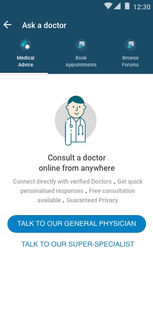
Patients got a rebuilt consult landing experience — clear service information and entry points for first-time users, past consultations surfaced for returning ones — refined across twelve wireframe iterations. Guerrilla usability with elderly, first-time users (a critical non-user group) drove reduced choice overload, step-by-step guidance, and real doctor photos over icons, so even a non-tech-savvy patient could begin a consultation with confidence.

A frictionless first run — for both doctor and patient
02 · People and automation working as one team — human in command

The e-consultation ecosystem already pairs people with automation, and I designed those touchpoints so the human always stays in control: a symptom checker triages a patient before a doctor is engaged, and on the doctor side every system-assisted e-prescription is previewed, editable, and approved before it ever reaches the patient — collaboration, never a black box.

The same pattern points to where the ecosystem goes next: clinical and front-desk staff working alongside assistants that draft a prescription, summarise a consult, suggest a lab booking, or pre-fill a follow-up — each surfaced as a reviewable draft with clear provenance, a confidence signal, and one-tap accept / edit / reject, so staff stay confidently in command while the routine work is handled for them.

Proposed pattern: the AI co-worker surfaces its work as a reviewable draft — provenance, a confidence signal, and one-tap accept / edit / reject keep clinical staff in command.

03 · Patients in control of what they act on

A prescription is a system-generated recommendation, so I designed the patient e-prescription to be transparent, editable, and refusable rather than something simply handed down:

  • Select or deselect each prescribed medicine and lab test before ordering
  • Open the full e-Rx to see the doctor's reasoning and details, and check availability inline
  • A plain-language disclaimer explains the limits of an online prescription

The principle — the person decides what they act on — is the same one I later studied directly in my research on human–AI trust and control in the multi-agent belonging case study.

The patient decides what to act on — accept, skip, or refuse
About the project

"Ask a Doctor" — online consultation that led nowhere

The product I worked on is "Ask a Doctor", 1mg's online doctor-consultation vertical. The major problem we set out to solve: a patient couldn't use their consultation to actually buy prescribed medicines or book the recommended lab tests. That limited the experience to just talking to a doctor — leaving the whole e-consultation ecosystem fragmented. The aim was to enhance the overall experience of online consulting and make it as seamless as possible across all of 1mg's verticals.

About 1mg. 1mg is India's leading consumer health platform. It aspires to be the trusted health partner for all Indians, with a mission to make healthcare accessible, understandable and affordable for a billion Indians — enabling consumers to learn more about their medicines and find more cost-effective substitutes.

Reason I took it on: a genuine interest in healthcare data and the possibility of meaningful digital intervention in this space.

The problem I set out to resolve

A care journey that broke right after the consult

Online consultation was a dead end. Patients consulted, then dropped off because they couldn't act on the advice. Doctors, meanwhile, found issuing a usable digital prescription slow, confusing, and error-prone — so they avoided the very feature that would complete the loop. Every broken handoff was both a care failure and lost cross-sell into pharmacy and labs.

Problem brief: How might we enhance the overall experience — for patients and doctors — of the online-consultation ecosystem, so as to make healthcare more accessible?
Research & problem framing

Mixed-methods research, double-diamond framing

I followed the double-diamond problem–solution approach to define the real problems faced by 1mg's users, through extensive user interviews, surveys, and field visits to nearby hospitals, clinics, doctors, and patients for richer contextual inquiry. The qualitative process included:

  • 80 user interviews via customer calls — a general understanding of the app's users
  • 52 survey respondents through social media — reaching non-users for unbiased signal
  • 20 contextual inquiries with patients at hospitals/clinics — capturing non-users' behaviour in their natural settings
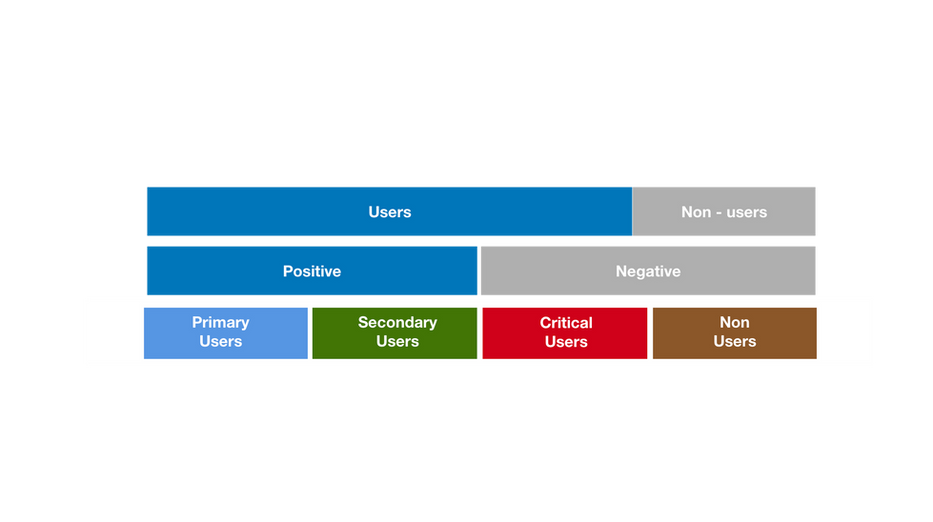
  • Affinity-mapping segmentation — elaborating the nuances of each user group

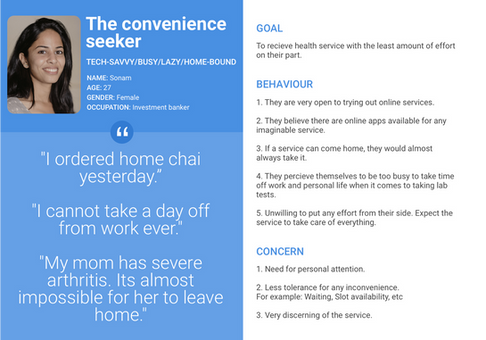
This synthesized into 11 personas across primary, secondary, critical, and non-user groups.

Double-diamond problem framing
Double-diamond problem framing across the consult ecosystem
User segmentation
User segmentation that drove the 11 personas
Persona
Primary user
Persona
Primary user
Persona
Secondary user
Persona
Critical user

Contextual inquiry

Before mapping user tasks, I re-interviewed users to understand: the pain points of using the e-consult service; reasons for using existing platforms; beliefs, fears, expectations and attitudes toward remote and tele-consultation; the perceived difference between physical and online consultation; and the problems faced by both doctors and patients in each phase of consultation.

Competitive analysis & journey mapping

I mapped the competitive landscape of online patient–doctor consultation platforms, then built a patient journey map across the phases of online consultation — actions per phase, features, gaps and opportunities, suggested design interventions, and a mood indicator. This located precisely where the experience broke and narrowed the work to a redesign of both the patient and doctor apps.

Competitive analysis
Competitive analysis of online-consultation platforms
Patient journey map
Patient journey map — locating where the experience broke
What the research revealed

Key insights

01

The journey broke after the consult

The sharp drop-off was the inability to act on advice — buy meds, book labs — not the conversation itself.

02

Doctors were a blocked stakeholder

Issuing an e-prescription in chat was slow and confusing, so doctors avoided it — starving the feature that completes the loop.

03

Elderly, non-tech users were the stress test

Field testing found choice overload, a need for step-by-step guidance, and distrust of icon-only doctor avatars.

The design solution

Redesigning the patient app and doctor app

The redesign had to serve five patient types: premium (paid), free (non-paid), users seeking a second opinion, users with multiple-speciality problems, and novice users who had never experienced remote consultation. Based on the pain points, gaps and opportunities, I finalised these features for the patient app:

  • Symptom checker and an "Ask a super-specialist" option
  • E-prescription available to the patient easily
  • Hassle-free online booking of appointments
  • Forums to check common concerns and reduce anxiety
  • Audio consultation for emergencies
  • A better follow-up system
  • Support across mobile, desktop and tablet

Information architecture

Using card sorting, I defined the architecture of the redesigned patient app — establishing how onboarding, services, consultations and history fit together.

Card sorting
Card sorting session
Card sorting
Synthesizing the structure
Information architecture
Final information architecture

Wireframing & iteration

The e-consult landing page had to surface: an entry to appointment booking; an entry to forums; service information for first-time users; buttons for Ask Doctor, Ask Super-specialist, and Symptom Checker with details; omni-channel communication; past consultations for returning users; and a start-new-consultation button. I worked through twelve wireframe iterations to balance all of this.

Iteration
First-time user
Iteration
First-time user
Iteration
Integrating channels
Iteration
Returning user

Final landing UI

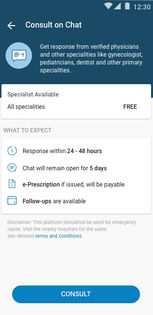
In the final design, the specialists and their detailed information are displayed before the conversation starts, to aid better decision-making by the patient. The entry point to audio consultation is introduced after a chat consultation begins, in case the patient chose chat from the initial list of services.

Landing first time
First-time / logged-out
Landing returning
Returning / logged-in
Service detail
Service detail page
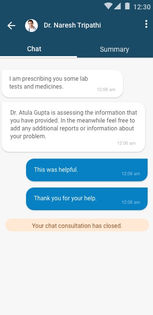
Chat consult
Chat consultation
The keystone feature

E-Prescription — closing the loop (doctor & patient)

A patient couldn't use a consultation to buy prescription medicines online, which limited the experience to "just consulting." On the doctor side, issuing an online prescription inside a chat was difficult, time-consuming, and often confusing for patients to decipher. The e-prescription feature cross-integrates with the pharmacy and labs verticals so the user's task flow through e-consultation is seamless and complete.

Doctor's app

The doctor flow lets a doctor: write a new Rx or check past ones; see patient details; prescribe lab tests and medicines (choosing medicine parameters while adding); add follow-up information; preview before sending; and use a collapsed view after adding a medicine.

Doctor e-prescription flow
Doctor-side e-prescription flow (final design)

Patient's app

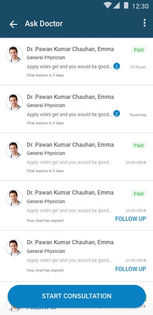
Once sent, the e-prescription appears in the patient's chat interface, letting them directly order medicines or lab tests — completing the ecosystem of patient care. Patients can: select/deselect prescribed lab tests to order; view prescribed medicines with dosage instructions and check availability without opening the e-Rx; view the full e-Rx; track lab-test status in chat; and share or download the prescription for future use (with doctor details, patient details, medicine list and dosage, investigative tests and follow-ups, lifestyle/diet instructions, and a disclaimer noting the Rx was issued online without a physical check-up).

Patient e-Rx
Order meds/labs from chat
e-Rx view
e-Rx in app, patient view
Downloaded e-Rx
Downloaded e-prescription

Booking-appointment feature (doctor)

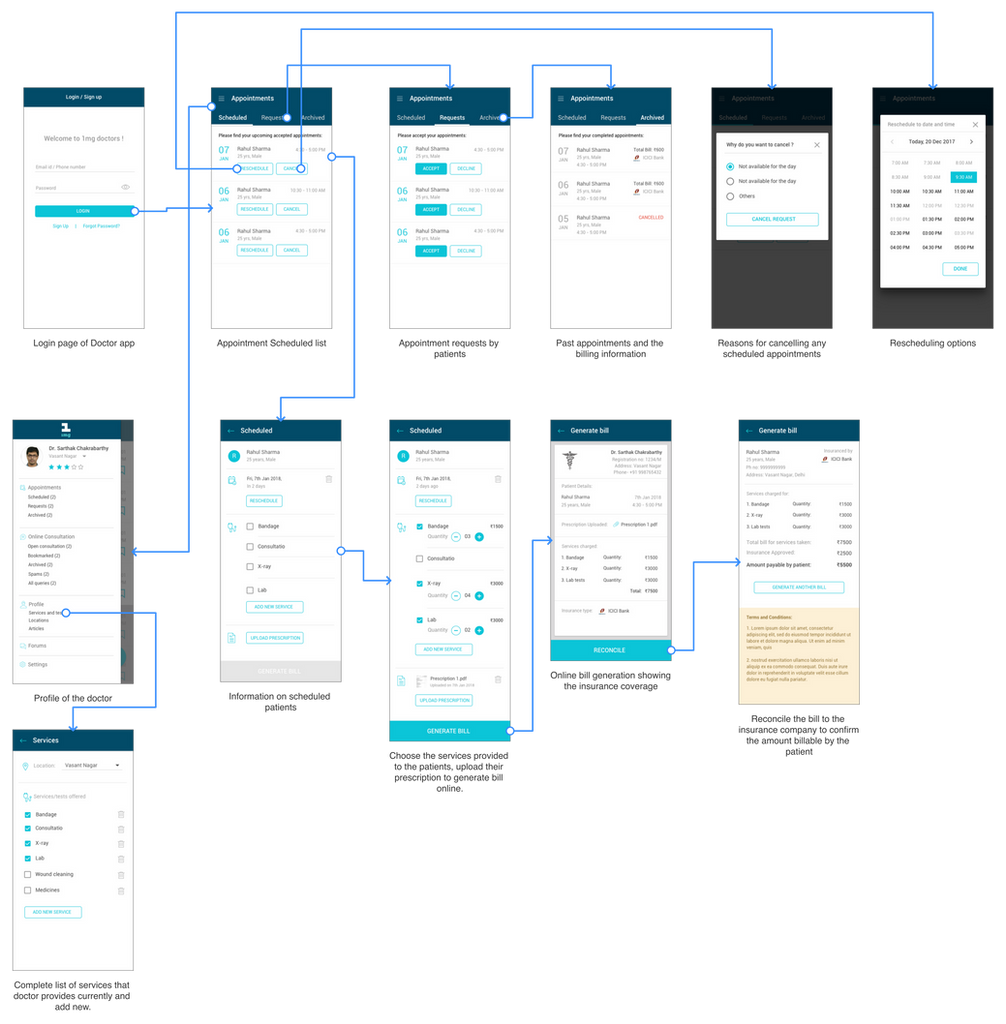
On the doctor side, the booking feature lets a doctor: generate the patient's bill online from a booked appointment (handling the insurance part of services); add the services they provide so patients can see them while booking; accept or decline requests (with a required reason on decline); reschedule or cancel appointments (with a required reason on cancellation); and track patients' past records and generated bills.

Doctor booking feature
Doctor-side booking & billing flow
Validation

Guerrilla usability testing with the hardest users

I ran a guerrilla study to assess the accessibility of the new e-consultation login, targeting elderly adults — a critical, largely non-user demographic. The focus was ease of navigation, clarity of instructions, button accessibility, and overall experience.

Findings & recommendations

My responsibilities & artifacts

What I owned as the designer

Design responsibilities
  • Framed the problem via double-diamond research
  • Ran mixed-methods research (80 interviews, 52 surveys, 20 contextual inquiries)
  • Synthesized 11 personas and a patient journey map
  • Defined information architecture via card sorting
  • Designed flows, wireframes & high-fidelity UI for patient and doctor apps
  • Designed the conversational e-prescription and booking flows
  • Planned & ran guerrilla usability testing; folded findings into UI
Artifacts delivered
  • Personas, journey map, competitive analysis
  • Information architecture & card-sort outputs
  • 12 wireframe iterations of the landing experience
  • High-fidelity patient app (landing, service detail, chat, summary)
  • Doctor app: e-prescription, booking & billing flows
  • Patient e-Rx interface + downloadable prescription
  • Usability test plan, findings & recommendations report
Impact as a designer

Shipped, and still in production

Note: due to some constraints, the full usage and revenue stats couldn't be documented online — happy to discuss them offline.

← All work Next: Open Budgets India →